Turbo invoice - how to send invoices faster

Cut down the time spent on invoicing to the absolute minimum. InvoiceOcean's new feature lets you skip most of the invoicing process - no more filling out your customer's contact info, sale details, tax rates and so on. Just leave it to your clients!
Cut down the time spent on invoicing to the absolute minimum. InvoiceOcean's new feature lets you skip most of the invoicing process - no more filling out your customer's contact info, sale details, tax rates and so on. Just leave it to your clients!
What Is a Turbo Invoice?
Both your and your customers' time is a precious resource - you have a mutual interest in conducting your business as quickly as possible. You probably remember at least one situation when you were held up in a queue because someone in front of you needed to get an invoice for their shopping. The same is true for many other cases: we all know how inconvenient it is to ask a plumber or auto mechanic for an invoice. InvoiceOcean's Turboinvoices are a solution to this problem - all you need to issue one is an e-mail address.
This kind of shortcut matters more than it might seem. For most small business invoicing, the slowest part of the job is never the math - it is typing out the same client details over and over again. Any invoicing software that removes that friction pays for itself in saved minutes, and those minutes add up quickly when you're issuing dozens of invoices a month.
How It Works
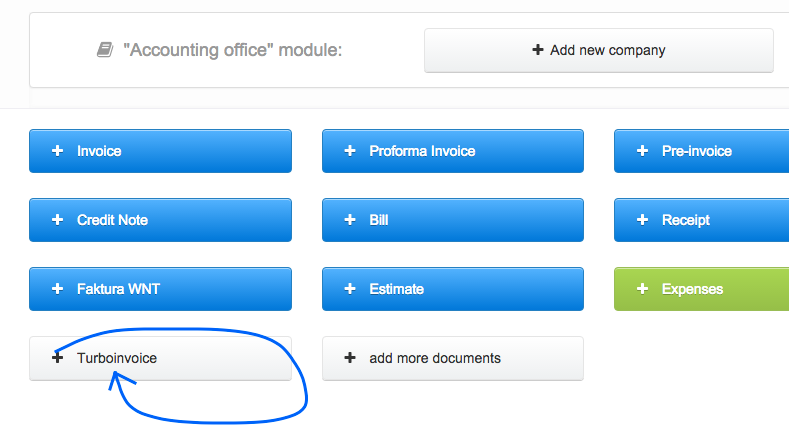
After clicking the Turbo Invoice button you will be prompted to enter your client's email address.
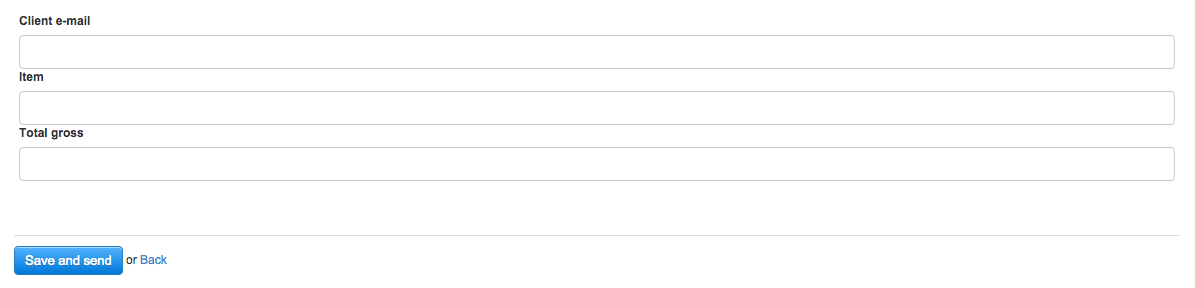
Then just start typing the name of the product or service you're issuing an invoice for, and the value will be completed automatically based on your InvoiceOcean inventory. The price, tax rate and full name will also be autocompleted.
Once a Turboinvoice is sent, it lands alongside the rest of your documents, so you can still create an invoice manually whenever a transaction calls for more detail, while letting the quick-entry route handle the routine cases.
Why Faster Invoicing Matters for Small Business
Speed is not just a convenience - it's a cash flow issue. The gap between finishing a job and sending the invoice is often the same gap that delays payment. Cutting that gap down, whether through a Turboinvoice or a well-designed invoice template, is one of the simplest ways to keep receivables moving. It's also why so many teams look for online invoicing tools that trim manual steps rather than add more fields to fill in.
Good invoicing software usually goes hand in hand with a few related habits: keeping a consistent invoice template so documents look professional regardless of who issues them, sending a polite payment reminder when a due date passes, and, for repeat clients, relying on recurring invoices instead of rebuilding the same document every billing cycle. None of these require extra effort once the underlying invoicing process is fast and reliable - which is exactly the gap Turboinvoice is designed to close for the initial, most repetitive step of e-invoicing: capturing who the invoice is for.
How Your Customers Benefit
Your customer will be emailed a link to the Turboinvoice. There they will be able to fill in their company's information at their convenience.
If you've set up online Autopayments on your InvoiceOcean account, your customer will also be able to immediately complete payment through a secure provider. Turboinvoice not only saves you time and money, but also helps protect the environment - there is no paper wasted on unnecessary printouts. Another benefit is the fact that e-invoices don't get lost - you can access them from any internet enabled device indefinitely.

A Win-Win Scenario
Turbo Invoices not only help you get rid of paper receipts and invoices, but also streamline book-keeping thanks to InvoiceOcean's integrated payment options. Invoicing and getting paid doesn't have to be difficult - with Turbo Invoices the entire process is quick, simple and painless, both for you and your customers.
Send your next invoice in 30 seconds
InvoiceOcean numbers your invoices, calculates tax and totals, and emails them to clients as PDF. Free plan with 3 invoices a month.
Try it for freeFrequently asked questions
What is a Turboinvoice in InvoiceOcean?
A Turboinvoice is a fast way to issue an invoice using only your client's e-mail address. Instead of filling in their contact details yourself, you send them a link and they complete their own company information.
Do I need my client's full company details to send a Turboinvoice?
No. You only need their e-mail address to get started - your client fills in their own contact and company information when they open the emailed link.
Can customers pay a Turboinvoice online?
Yes, if you have Autopayments set up on your InvoiceOcean account, your customer can complete payment immediately through a secure provider after receiving the Turboinvoice.
How does a Turboinvoice help with book-keeping?
Since Turboinvoices are sent and stored electronically, there is no paper to lose or misfile, and they work together with InvoiceOcean's integrated payment options to keep your records organized.