Sales reports and charts for your business
Follow revenue, expenses, clients and unpaid invoices with ready-made reports and charts based on your documents.
Try it for free
Reports and charts
With our invoicing app, you can receive comprehensive reports on daily or monthly sales volumes or amounts, customers and products, as well as cash reports, among other things.
With one click you can create and print a sales report for the previous year or month, compare data or plan future goals.
Compare data, identify trends and use this information to optimise operations. Not only does this speed up decision-making processes, but it also helps you better understand your own company's operations.
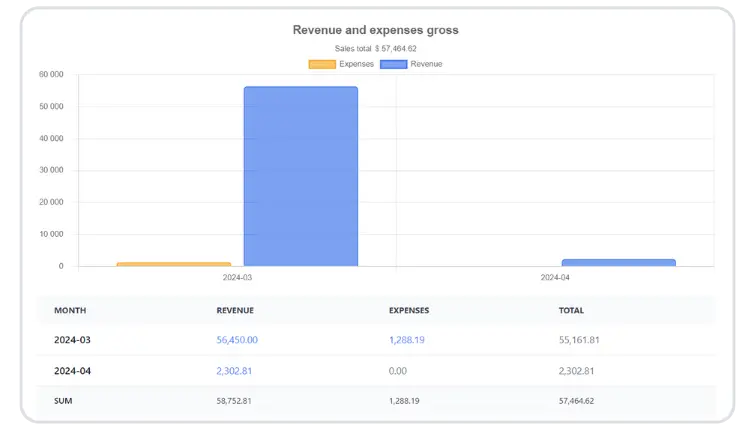
Charts
The Charts tab presents your data as bar charts. You will find four of them there: Revenue and expenses, Revenue, Expenses and Sales count.
Reports list
The Reports list tab groups the reports by subject:
- Finances - registry of VAT sales, invoice list, list of expenses, department balance, income and expense categories, list of unpaid invoices.
- Products - sales, purchases and margin.
- Warehouses - summary of warehouse actions, cost inventory and product quantity and value statements.
- Clients - clients report and customer balance.
- Accounting - registries of VAT sales and VAT purchases.
- Cash - cash report.
How to generate a report
Choose the report, set its parameters and click Generate report. You can narrow the results with filters such as the date range, department, document type, status or user.
Reports - frequently asked questions
Which report shows unpaid invoices?
The List of unpaid invoices, under Reports > Reports list > Finances. It shows unpaid invoices for the chosen period, the number of days in arrears and the number of reminders sent.
Can I see how much each client has bought?
Yes. The Clients report shows the number of invoices and the total gross value for each client, and the Customer balance report adds the amounts paid and still due.
Does the revenue report include VAT?
No. Revenue is calculated from net values, so VAT is not included.
Can I hide reports from some users?
Yes. In Settings > Account settings > Configuration > Users and privileges you can restrict access to reports for users. The restriction does not apply to administrators.