Give your team and your accountant access to invoices
Invite colleagues and your accountant to one account and decide exactly what each of them can see and do.
Try it for free
Multiple users
Do you want others to have access to your online invoices? With InvoiceOcean, it's possible.
You can create accounts for colleagues or grant access to accounting office staff. Users with restricted access will only be able, for example, to view and send new documents as they appear, but will not be able to create them.
Thanks to this solution, you will save the time needed to physically deliver documents to the accounting department and, in addition, you will be assured of the security of your company's financial activities.
Roles in InvoiceOcean
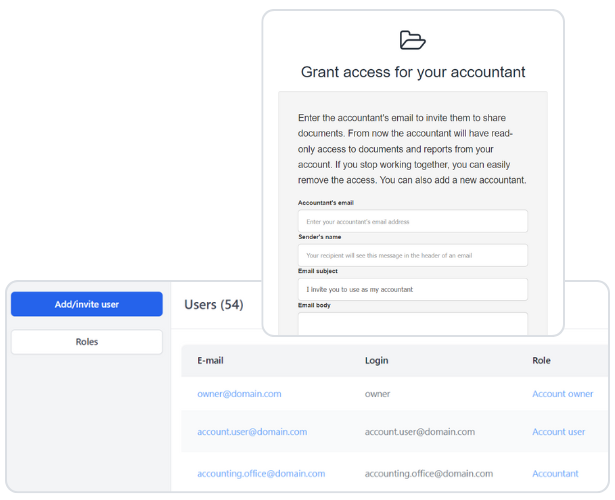
- Account owner - the person who registered the account; has access to the full account configuration.
- Administrator - has access to account settings and can add more users.
- User - issues, prints and sends documents, without access to account settings.
- Accountant - a member of your accounting office with ongoing access to the documents you issue.
Custom roles
If the ready-made roles do not fit, create your own. Go to Settings > Users > Roles > Add new role, name the role and tick the privileges it should include - for example access to invoices, products, clients, warehouse documents or payments.
How to add a user
Go to Settings > Users > Add/invite user. You can send an invitation and wait for the person to accept it, or create the user straight away and set a password for them. Every user logs in with their own email address and password.
Access for your accountant
Choose Settings > Accountant access, enter the email address of your accountant and send the invitation. This option is available in every plan and one accountant does not count towards the user limit. You can disconnect the accountant at any time.
Multiple users - frequently asked questions
How many users can I add?
The Free and Basic plans include 1 user, the Professional plan 3 users, and the Enterprise plan an unlimited number. See pricing for details.
Can a user be limited to one department?
Yes. By default a user has access to every department, but you can assign them to a selected department only.
Can I stop users from editing or deleting invoices?
Yes. You can block editing and deleting in Settings > Account settings > Configuration > Users and privileges, or use a custom role without those privileges.
Does my accountant count as a user?
One accountant can be added to every account without counting towards the user limit of your plan.