Recurring invoices issued and sent automatically
Set the client, the amount and the interval once, and InvoiceOcean issues each following invoice for you.
Try it for free
Recurring invoices
At InvoiceOcean, we take care of automating the documentation flow in your company. If you have a customer that you invoice every two months or every quarter, for example, we have a solution for you.
At intervals of your choosing, new invoices will appear in the system and an email will be sent to the system administrator informing them of the new invoice. Such invoices can also be automatically sent to the customer's e-mail address.
How to set up a recurring invoice
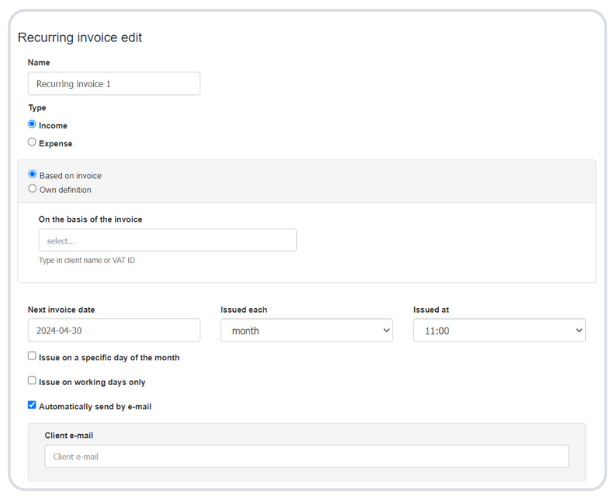
Switch the feature on in Settings > Account settings > Your account by ticking Enable recurring invoices. Then go to Income > Recurring invoices > New recurring invoice. You can base the cycle on an invoice you have already issued, or use your own definition and enter the seller, client, product, quantity, price and currency.
Schedule
- First invoice date - the day the cycle starts.
- Interval - every week, month, 2 months, 3 months, 6 months or year.
- Specific day of the month - for example the 1st of each month.
- Working days only - invoices are issued from Monday to Friday, so a date that falls on a weekend is moved to a working day.
- End date - the day after which no more invoices are issued.
Notifications and payment status
Each time an invoice is issued from the cycle, InvoiceOcean can send you an email notification with the invoice number, date and buyer - this is switched on by default. Invoices are created with the status issued, and you can also have them issued as paid.
Recurring invoices - frequently asked questions
How often can a recurring invoice be issued?
Every week, every month, every 2, 3 or 6 months, or once a year.
Can recurring invoices be sent to the client automatically?
Yes. Invoices from the cycle can be issued and emailed to your client automatically.
How do I stop a recurring invoice?
Edit the recurring invoice and enter an End date. No more invoices will be issued for that cycle after this date.
Which plans include recurring invoices?
Recurring invoices are available in the Professional and Enterprise plans. See pricing for details.