Warehouse management in your invoicing software
Track stock in one or more warehouses, issue warehouse documents and link them to your invoices in InvoiceOcean.
Try it for free
Warehouse management
After activating the option for warehouses, you can start managing your stock in one or more warehouses and issue warehouse documents.
- AG – Acceptance of goods
- RG – Release of goods
- PZk – Acceptance of goods correction
- WZk – Release of goods correction
- II – Internal incomings
- IO – Internal outgoings
- TW – Transfers between warehouses
- PO – Purchase order
- Reservation
- Stocktaking
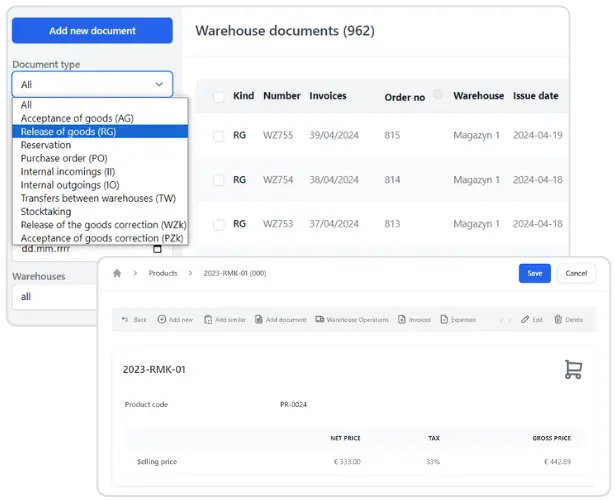
Product prices can be entered in any currency (EUR, USD, GBP, CZK, PLN, etc.) and are automatically converted to the main currency specified by the user.
When managing multiple warehouses, you can specify different selling prices in each warehouse.
It is up to the user to decide whether to include purchase prices in the stock document printouts. When issuing invoices, it is possible to specify from which warehouse the products are taken. This ensures that the system knows the exact status of the products in each warehouse.
The account owner can restrict access to selected warehouses to individual users invited to the system. Users will only be able to retrieve products for invoicing from assigned warehouses.
This keeps your sales and stock records consistent.
How to switch on warehouse management
Go to Settings > Account settings and tick the Warehouse management box. A Warehouse tab then appears in the menu, with your products, warehouse documents and the list of warehouses. Warehouse management is available from the Professional plan: you can run up to 3 warehouses on Professional and an unlimited number on Enterprise. See pricing for details.
Warehouse documents linked to invoices
You can generate a warehouse document from an invoice, or have InvoiceOcean create it automatically each time you issue an invoice. It also works the other way round: you can issue an invoice based on a warehouse document, or one invoice based on several warehouse documents. Services listed on the invoice are not transferred to the warehouse document.
Keeping stock under control
If you do not want to sell more than you have, switch on the option that stops products that are not in stock from being added to an invoice. It works for products with quantitative restrictions enabled on the product card and does not apply to invoices issued through the API.
Looking for more? See everything the warehouse software can do.
Warehouse management - frequently asked questions
How many warehouses can I have?
Up to 3 on the Professional plan and an unlimited number on the Enterprise plan.
Can I issue an invoice based on a warehouse document?
Yes. You can issue an invoice from a single warehouse document or one invoice from several warehouse documents.
Can InvoiceOcean create warehouse documents automatically?
Yes. When the option is enabled in Settings > Account settings > Configuration > Warehouses, a warehouse document is created after you issue an invoice.
Can I set different prices in each warehouse?
Yes. On the product card you can enter separate sales prices for each warehouse.
Can a user see only one warehouse?
Yes. The account owner can restrict the visibility of warehouses, so that a user sees only the warehouse they are assigned to, or block access to warehouses altogether.